
 By Neil
Tired of dealing with distracting watermarks in your photos? Whether it’s a logo watermark, a signature, or even a date stamp, Picsman offers a simple, fast, and free solution to clean up your images. With both an online platform and mobile apps, you can effortlessly remove watermarks everywhere. Say goodbye to complicated software and hello to hassle-free editing with Picsman—your ultimate tool for AI-powered watermark removal.
- 1. What Is a Watermark?
- 2. Why You Might Want to Remove Watermarks
- 3. Photoshop vs. Picsman
- 4. Step-by-Step Guide: How to Remove Watermarks from Photos with AI
- 5. What’s More:
- 6. Can I Remove Watermarks on My Phone?
- 7. Key Benefits of Using Picsman’s AI Watermark Remover
- 8. Final Thoughts: Get Clean, Professional Photos in Seconds
1. What Is a Watermark?
A watermark is a semi-transparent image, text, logo, signature, or date stamp that is placed on top of a photo, video, or document. Its primary purpose is to protect the content from unauthorized use by marking it with the creator’s or owner’s name, logo, or brand. Therefore, watermarks are often used to indicate copyright, prevent theft, and promote ownership.

2. Why You Might Want to Remove Watermarks
1. Enhancing Personal Photos
Sometimes, we take a great picture, but it comes with a watermark on the screen, like a logo or text. This watermark can distract from the image itself. Therefore, many people turn to a watermarkremover to clean up their photos. By using a logo remover, you can make your photos look clean and professional.
2. Creating Professional Content
If you’re creating content for marketing or a presentation, watermark removal for free helps make your images look polished. For example, if you have a signature watermark or a logo watermark on a stock image, it may not align with your brand’s aesthetics.
3. Restoring Old Photos
Old photos often have a date stamp or a signature watermark. If you want to restore these photos or make them presentable, you can remove the photo date stamp using online tools. This helps bring old memories back to life without the distraction of watermarks.
4. Social Media Posts
When posting photos online, watermarks like the TikTok logo can be unwanted. In such cases, people often look for ways to remove the TikTok logo from videos or images. This ensures that their posts appear clean and free of branding from external platforms.
3. Photoshop vs. Picsman
If you’re looking to remove watermarks, you might immediately think of using Photoshop. However, Photoshop requires advanced skills and proficiency to handle watermark removal. You also need to download the app, pay for it, and go through a series of complex steps. This can be a time-consuming process for someone who just wants to quickly clean up a photo.
Good news! There’s a much easier solution—Picsman. Picsman has become a game-changer for those looking to remove watermarks from photos for free. With Picsman, you no longer need complicated software or advanced technical skills. Upload your photo, and with just a few clicks, remove the watermark from the photo seamlessly.
You can click here to see how things work in Photoshop versus Picsman.
4. Step-by-Step Guide: How to Remove Watermarks from Photos with AI
Step 1: Drag or drop your photo on Picsman AI Watermark Remover Online

Step 2: Click “Remove” and Let AI Work Its Magic
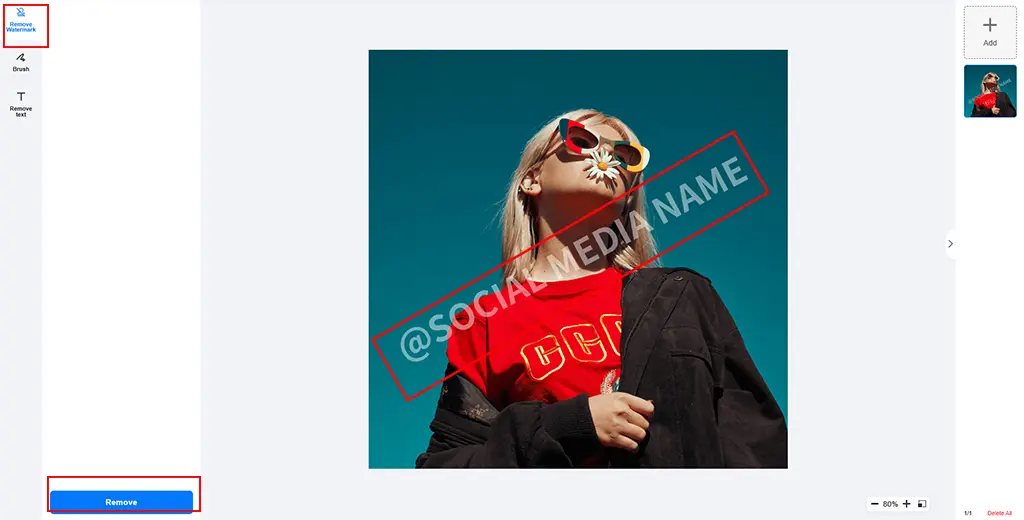
Step 3: Download Your Clean Photo

5. What’s More:
With Picsman’s AI Watermark Remover, you can remove various types of watermarks, including text watermarks, logos and branding, date stamps, screen watermarks, and signature watermarks.
Furthermore, Picsman also allows you to remove unwanted objects and people from your photos. For instance:
- Remove People from Travel Photos
If there are strangers or unwanted people in your travel photos, Picsman lets you erase them seamlessly.
- Smooth Out Wrinkles or Blemishes in Portraits
Want a flawless portrait? Picsman can remove wrinkles and fix blemishes to create a perfect image.
- Edit Mockup Templates
If you have a logo background removal issue on mockup templates, you can use Picsman to remove watermarks from photos for free and remove text or patterns you don’t need.
- Remove Unwanted People or Objects in Scenery Photos
Take control of your landscape shots. Whether it’s people or distracting objects, Picsman can remove a watermark from a photo and clean up your pictures effortlessly.
- Clean Up Product Photos
If there are unwanted items or background distractions in your product images, Picsman can help give you the perfect shot.

6. Can I Remove Watermarks on My Phone?
Yes, you can remove the water mark on your phone or computer, and you don’t have to download the app if you don’t want to! Picsman offers both a mobile app and a web-based tool, giving you the flexibility to choose what works best for you. If you prefer not to download anything, use Picsman’s online website on iPhone or Android directly from your browser.
Besides, for those who prefer the convenience of an app, Picsman also offers mobile and desktop apps that let you access advanced features anytime. With this powerful AI tool, you can always count on fast, high-quality watermark removal.
7. Key Benefits of Using Picsman’s AI Watermark Remover
😊🚀 Fast and beginner-friendly
🏅📷 High image quality
🚫📲 No download required
🔒🖼️ Safe and private image handling
🎁🛠️ Optional Pro Tools—users have a 3-day free trial now!
8. Final Thoughts: Get Clean, Professional Photos in Seconds
Removing watermarks from your photos enhances their professional look. Whether you need to remove a watermark from a photo for free or want a tool to remove text from a picture, Picsman makes the process quick and easy.
You deserve stunning, clean images for personal or business use in seconds. Try Picsman AI Watermark Remover today and get your photos watermark-free!